



Most invoice automation demos look similar. A PDF goes in, structured fields come out, and the interface is clean. The differences show up later: when a total is wrong, when a purchase order is partially billed, when an auditor asks who approved a payment, or when procurement asks where the data lives.
These are the questions worth asking before you buy.
1. Can you show me the source behind every field?
Ask for a field-level trace: the page, the verbatim text, and the extraction run behind each value. If the vendor cannot show provenance, every exception becomes a manual re-read and every audit question becomes a search through a shared inbox.
2. What happens when the model is wrong?
Every system will be wrong. The question is what it does next. A confidence score alone is not enough. Look for a second pass that checks totals, tax, dates, currencies, and duplicates against the source.
Ask to see a low-confidence invoice and a mismatched total. A good system routes both to a person. A weak one auto-approves the plausible answer.
3. Who reviews, and where?
Invoice approval is a team workflow. Can comments and @mentions stay on the invoice? Can approvals happen in Slack? Do owner, admin, and member roles separate the right actions? Does every approve or reject require a recorded reason?
4. Does it handle purchase orders and partial billing?
Matching an invoice to a PO is easy when the invoice is for the full amount. The real test is a PO billed across several invoices. Ask how remaining balances, over-billing, and partial receipts are handled, and ask to see the PO detail page.
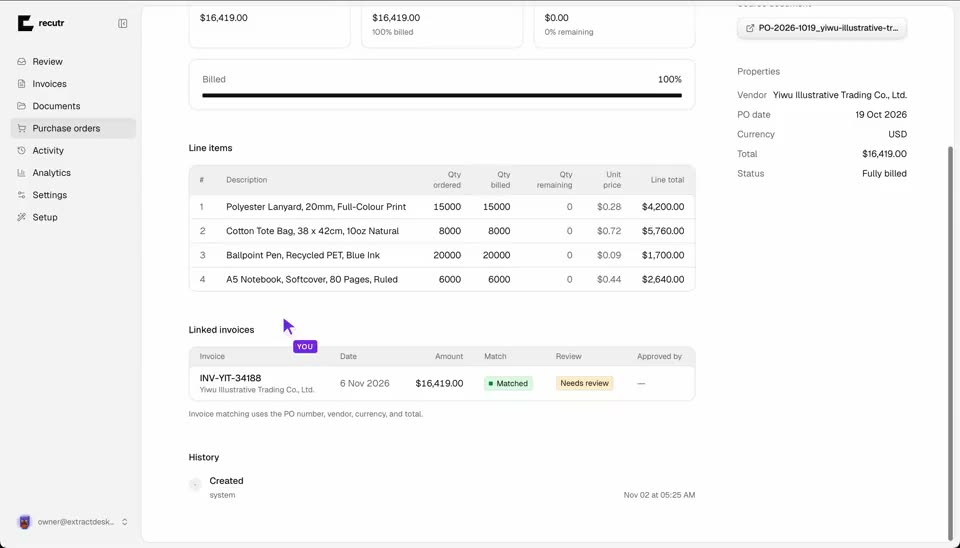
5. What posts to accounting, and what is attached?
Approved invoices should post as bills with the source PDF attached. Ask about supplier creation, tax mapping, auto-post, retry, and void. A posting batch that cannot be retried or voided is an audit problem waiting to happen.
6. Where does the data live?
Finance data is not a generic SaaS workload. Ask whether each workspace gets its own deployment and database, how integration credentials are encrypted, where backups live, and whether self-hosting is available.
7. What happens as the team and volume grow?
Per-seat pricing punishes you for adding approvers. Ask what one price covers, what counts toward the invoice limit, and what happens at the cap. A predictable per-desk price is easier to budget than a bill that grows with headcount.
8. What does the audit trail actually show?
A useful audit trail shows the upload, the agents that ran, the extraction, the review flags, the person who approved or rejected, the reason, and the posting event. Ask to see a record end to end, not a screenshot of a log.
9. Can we export everything?
Exports are an exit right and an integration path. CSV, Excel, JSON, and a Sheets mirror should be standard. Ask what happens to the source files and the audit history if you leave.
10. How long until the first approved invoice?
Ask for a realistic onboarding plan: inbox connection, first extraction, review setup, accounting connection, and the first approved invoice. A demo that takes an afternoon to configure is not the same as a workflow that goes live in a day.
A useful test
Bring twenty real invoices, redacted if needed. Include a duplicate, a partial PO, a credit note, and one document with a mismatch. Watch how the system handles each one. The demo that impresses is the one that shows the exceptions clearly, not the one that claims there are none.
The right system is not the one that extracts the most fields. It is the one that makes the record safe to approve.